
Versamax PLC Guide for Plant Engineers in 2026
Versamax is a line of programmable logic controllers (PLCs) built by GE Intelligent Platforms, now supported under Emerson, designed for modular industrial automation across manufacturing and plant control environments. Plant engineers rely on these controllers for everything from discrete I/O control to analog process management. Programming, addressing, and licensing each carry specific requirements that trip up even experienced technicians. This guide covers the hardware architecture, software tools, addressing logic, troubleshooting steps, and upgrade paths you need to keep Versamax systems running or decide when to move on.
What are the core Versamax hardware components and features?
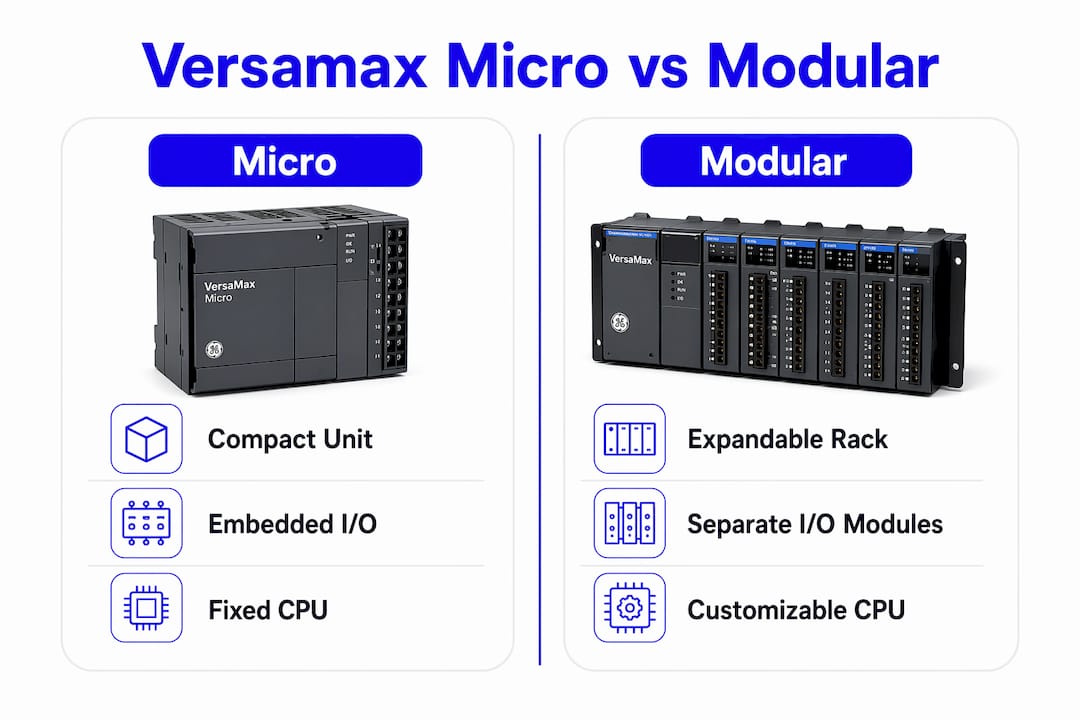
The Versamax platform splits into two distinct product families: the Micro series and the Modular series. Each serves a different scale of application, and mixing up their capabilities leads to poor system design decisions.
Micro series: compact and self-contained
The Versamax Micro PLC combines the CPU and embedded I/O in a single base unit. The IC200UDR010, for example, ships with 12 DC inputs and 8 relay outputs. That makes it well suited for space-constrained applications where a full rack is impractical. Communication ports on Micro units typically include RS-232 for serial programming connections.
Modular series: expandable rack architecture
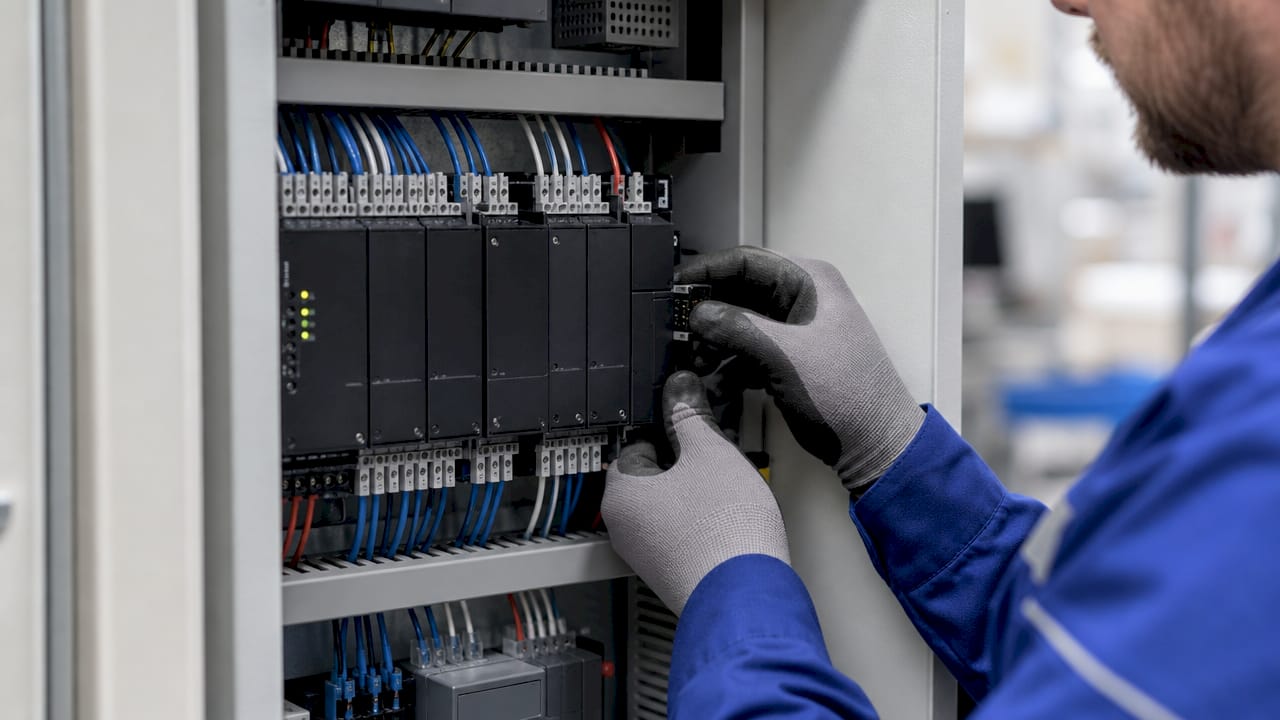
The Modular series uses a backplane rack where you add discrete CPU, power supply, and I/O modules independently. This architecture supports a wider range of digital and analog I/O configurations. Ethernet communication modules are available for network integration. The trade-off is physical size and the added complexity of manual address assignment, which the Micro series handles automatically.
Key hardware specifications at a glance:
| Feature | Versamax Micro | Versamax Modular |
|---|---|---|
| I/O integration | Embedded in base unit | Separate plug-in modules |
| Address assignment | Automatic | Manual per module |
| Communication ports | RS-232 standard | RS-232 and Ethernet options |
| Expansion capability | Limited | High (multi-slot rack) |
| Typical use case | Compact, single-machine control | Multi-zone plant control |
The Modular series fits plant-wide control applications where you need to expand I/O over time. The Micro series fits standalone machine control where the footprint matters more than flexibility.
How to program and configure Versamax PLCs: software and licensing
Proficy Machine Edition, specifically the Logic Developer for PLC component, is the official programming tool for Versamax controllers. A paid license is required. A Lite version exists for scaled-down programming tasks, but full ladder logic development and hardware configuration require the standard license.
Licensing became significantly more complicated after Emerson acquired GE Intelligent Platforms. Device-locked license errors occur because node-locked licenses are bound to original hardware fingerprints and new server endpoints. Engineers who reinstall Windows or replace a PC often find their license invalidated. This is one of the most common support calls in legacy Versamax environments.
Software setup checklist:
- Use Logic Developer v5.0 or later for Windows 10/11 compatibility
- Purchase a Logic Developer PLC license, not just a PC simulation license
- Verify your license type: node-locked licenses tie to one machine; floating licenses allow network sharing
- Avoid VersaPro entirely. It is obsolete and causes errors on modern operating systems
- Confirm the PLC is in PROG mode before attempting any program download
The distinction between a Logic Developer PLC license and a PC simulation license catches many technicians off guard. The simulation license lets you test logic on a virtual controller. It does not allow you to connect to physical hardware. You need the PLC license for that.
Pro Tip: Before purchasing a used Versamax system, verify whether a valid Logic Developer PLC license transfers with it. Licenses are often non-transferable, and replacement licenses carry a significant cost.
The basic programming workflow follows this sequence: open Logic Developer, create or import your project, configure hardware to match physical rack layout, switch the PLC to PROG mode, then download. Attempting a download while the PLC is in RUN mode causes a communication failure every time.
What are key addressing differences between Versamax Micro and Modular?
Addressing is where most configuration errors originate. The two Versamax platforms use fundamentally different approaches, and treating them the same way causes faults that are difficult to diagnose after the fact.
The Micro series auto-assigns I/O addresses starting at %I0001 for digital inputs and %Q0001 for digital outputs. You do not configure these manually. The CPU handles the mapping based on the physical layout of the base unit. This simplifies setup but also means you cannot rearrange address blocks without changing hardware.
The Modular series requires you to assign a starting address for each module manually inside the Hardware Configuration tool within Logic Developer. Here is the correct sequence:
- Open the Hardware Configuration tool in Logic Developer.
- Add each physical module to the rack in the correct slot position.
- Assign a unique starting address to each I/O module.
- Verify that no two modules share overlapping address ranges.
- Save and download the hardware configuration before downloading the logic program.
Overlapping address ranges on Modular systems cause system faults or unpredictable PLC behavior. The Hardware Configuration tool does not always flag conflicts automatically. You need to check manually.
Memory registers follow the standard GE reference format: %R for data registers, %T for timers, and %C for counters. These are consistent across both Micro and Modular platforms. The addressing difference applies only to physical I/O modules.
Pro Tip: Create a printed I/O address map for every Modular rack and tape it inside the panel door. When a technician troubleshoots at 2 AM, that map prevents address conflicts from being introduced during emergency modifications.
What are common troubleshooting tips for Versamax systems?
Most Versamax failures fall into three categories: communication errors, licensing problems, and I/O faults. Knowing which category you are in cuts diagnostic time significantly.
Communication troubleshooting:
- Verify the correct COM port is selected in Logic Developer’s communication settings
- Check cable type: Versamax Micro units typically use a specific serial cable, not a standard RS-232 null modem
- Confirm baud rate matches between software and PLC settings
- For Ethernet-connected Modular units, verify IP address assignment and subnet mask
Licensing troubleshooting:
- Open the Proficy license manager and check for “device locked” or “invalid license” status
- If the license is locked to a previous machine, contact Emerson’s license support team for a transfer request
- Keep a record of your license activation codes in a location separate from the PC itself
I/O and firmware checks:
- Check the PLC fault table in Logic Developer for specific fault codes
- Verify firmware version matches the version expected by your Logic Developer installation
- Review the PLC maintenance schedule for your facility to catch aging components before they fail
Pro Tip: Always switch the PLC to PROG mode before downloading updated logic or hardware configuration. Downloading to a PLC in RUN mode fails silently in some versions of Logic Developer, leaving you with the old program still running.
Periodic maintenance on Versamax hardware should include inspecting backplane connectors for corrosion, checking power supply output voltage under load, and replacing battery-backed RAM batteries on a fixed schedule. Industrialpartsusa stocks replacement modules and spare parts for both Micro and Modular series, which matters when a failed module has a long OEM lead time.
What are practical upgrade paths and Versamax alternatives?
The decision to upgrade or replace a Versamax system comes down to three factors: software licensing cost, hardware availability, and the complexity of your existing logic. When licensing costs approach or exceed the cost of new hardware, replacement becomes the rational choice.
AutomationDirect Direct Logic and Siemens LOGO! are the most commonly cited alternatives for engineers leaving legacy Versamax setups. Direct Logic includes DirectSOFT programming software at no additional cost. Siemens LOGO! targets basic control tasks at a lower entry price. Both eliminate the Proficy licensing burden entirely.
For engineers who want to stay within the GE Emerson ecosystem, the GE Intelligent Platforms legacy hardware guide covers migration paths to the RX3i platform, which supports modern Ethernet protocols and current Windows programming environments.
Upgrade decision framework:
| Situation | Recommended action |
|---|---|
| Single unit, low I/O count | Evaluate Direct Logic or LOGO! as cost-effective replacements |
| Multi-rack Modular system | Assess RX3i migration with logic conversion |
| License cost exceeds hardware value | Replace hardware and reprogram from scratch |
| Parts available, logic complex | Maintain with surplus parts from Industrialpartsusa |
| Firmware incompatible with current OS | Upgrade Logic Developer version first before replacing hardware |
Industrialpartsusa supports migration by supplying tested surplus Versamax modules for systems that need to keep running during a phased upgrade. That approach lets you replace failed modules immediately while planning a full migration on a longer timeline. The automation upgrade checklist from Industrialpartsusa walks through the evaluation criteria in detail.
Firmware compatibility deserves attention before any software upgrade. A newer version of Logic Developer may not support older Versamax CPU firmware without a firmware update. Confirm compatibility before upgrading software on a production system.
Key Takeaways
Versamax PLCs require distinct approaches for Micro and Modular platforms across addressing, software licensing, and maintenance to avoid configuration errors and unplanned downtime.
| Point | Details |
|---|---|
| Micro vs. Modular addressing | Micro auto-assigns I/O addresses; Modular requires manual assignment per module in Hardware Configuration. |
| Licensing is a real cost | Logic Developer PLC licenses are node-locked and non-trivial to transfer after hardware changes. |
| PROG mode before download | Always switch the PLC to PROG mode before downloading logic or hardware configuration. |
| Upgrade triggers | Replace when licensing costs exceed hardware value or when parts become unavailable from any source. |
| Surplus parts extend life | Industrialpartsusa stocks tested Versamax modules that keep legacy systems running during phased migrations. |
What I’ve learned from years of watching Versamax systems fail and survive
The most expensive Versamax mistakes I see are not hardware failures. They are licensing failures that happen at the worst possible time, usually during a production emergency when someone reinstalls Windows on the programming laptop without backing up the license first. The hardware is fine. The program is fine. But nobody can get into the PLC because the license is gone.
The second most common mistake is treating Micro and Modular addressing as interchangeable. Engineers who learn on Micro units and then move to Modular racks often skip the manual address assignment step because it was never required before. The system appears to work until a specific I/O combination triggers an address conflict, and then the fault is nearly impossible to trace without the original hardware configuration file.
My practical recommendation: document everything before you touch a running system. Export the hardware configuration, save the logic program, and record the license activation code. Do this before any software update, any PC replacement, or any module swap. That documentation takes 20 minutes and has saved weeks of recovery time.
On the upgrade question, I think engineers underestimate how much the Proficy licensing cost changes the math. When you factor in the license, the programming PC, and the time to manage renewals, a modern PLC with free programming software often costs less over five years even if the hardware price is similar. Run the total cost comparison before committing to another cycle of legacy maintenance.
— Monica
Versamax parts and support from Industrialpartsusa
Industrialpartsusa stocks new, surplus, and remanufactured Versamax modules for both Micro and Modular series, with same-day shipping on in-stock items. Every part ships with a one-year warranty backed by in-house testing and repair capabilities.
For plant engineers managing legacy GE Emerson systems, Industrialpartsusa provides direct access to hard-to-find replacement modules that carry long OEM lead times. The team also supports migration planning for engineers evaluating obsolete parts alternatives or phased upgrades to newer platforms. Contact Industrialpartsusa directly for parts availability, pricing, and technical guidance on your specific Versamax configuration.
FAQ
What software do I need to program a Versamax PLC?
Proficy Machine Edition with a Logic Developer PLC license is the required programming tool. Use version 5.0 or later for compatibility with Windows 10 and Windows 11.
Why does my Proficy license show “device locked” after a PC change?
Node-locked licenses bind to the original hardware fingerprint of the programming PC. A PC replacement or Windows reinstall invalidates the binding, and you must contact Emerson’s license support team to request a transfer.
What is the difference between Versamax Micro and Modular addressing?
Micro units automatically assign I/O addresses starting at %I0001 and %Q0001. Modular units require manual starting address assignment for each module inside the Hardware Configuration tool.
Can I use VersaPro to program a Versamax PLC on a modern PC?
VersaPro is obsolete and causes errors on current operating systems. Logic Developer is the correct replacement and the only supported option for active Versamax deployments.
What are the best alternatives to Versamax for a single-unit application?
AutomationDirect Direct Logic and Siemens LOGO! are the most practical alternatives. Both include free programming software, which eliminates the Proficy licensing cost that makes single-unit Versamax deployments expensive to maintain.
Recommended
- Manufacturing Plant PLC Maintenance Schedule in 2026 – Global Electrical and Industrial
- RX3i PLC Guide for Plant Engineers: 2026 Edition – Global Electrical and Industrial
- How Robots Integrate with PLCs: Engineer’s 2026 Guide – Global Electrical and Industrial
- Field Control Strategies for Industrial Manufacturing in 2026 – Global Electrical and Industrial