
Manufacturing Plant PLC Maintenance Schedule in 2026
Running a manufacturing plant on reactive PLC repairs is like waiting for a tire blowout before checking tire pressure. A structured manufacturing plant PLC maintenance schedule, formally called a preventive maintenance program for programmable logic controllers, is what separates plants that hit their uptime targets from those managing daily firefighting. Reactive maintenance costs plants an average of 25 unplanned downtime hours monthly, and most of that loss is preventable. This guide gives you the specific tasks, intervals, roles, and metrics to build a PLC maintenance program that actually holds up under production pressure.
Table of Contents
- Key Takeaways
- Your Manufacturing Plant PLC Maintenance Schedule: The Foundation
- Building and Implementing a PLC Maintenance Schedule
- Common mistakes in PLC maintenance scheduling
- Measuring success and refining your schedule
- My take on the planning-scheduling divide
- Keep your PLCs running with the right parts on hand
- FAQ
Key Takeaways
| Point | Details |
|---|---|
| Separate planning from scheduling | Assigning these as two distinct roles is the single highest-impact change for schedule compliance. |
| Use tiered maintenance intervals | Layer daily, weekly, monthly, quarterly, and annual tasks based on equipment criticality and environment. |
| Mine PLC data for early warnings | Fault registers, cycle counts, and runtime hours predict failures without adding extra sensors. |
| Track schedule compliance above 90% | Plants hitting this threshold demonstrate a genuinely reliable maintenance program. |
| Source parts before you need them | Pre-staging spare modules, especially legacy components, prevents multi-day outages when a PLC fails. |
Your Manufacturing Plant PLC Maintenance Schedule: The Foundation
Before you schedule a single work order, you need to understand what a PLC maintenance schedule actually requires. The industry term is a preventive maintenance program, and it covers both hardware tasks (cleaning, inspection, torque checks) and software tasks (fault log review, backup verification, firmware checks). Many plants conflate these into a single loosely managed checklist. That approach fails because it treats two completely different functions as one job.
Planning vs. scheduling: why the distinction matters
Separating the planning role from the scheduling role is the highest-leverage change a maintenance department can make. Planning means defining the work: writing the procedure, listing the parts, identifying safety requirements, and estimating labor hours. Scheduling means committing that prepared work to a specific technician within a confirmed equipment downtime window. When one person tries to do both simultaneously, neither gets done well.
A planner for a line running GE Fanuc RX3i controllers, for example, builds the work order days in advance. The work order specifies the cleaning kit, the backup drive, the torque spec for terminal blocks, and the lockout/tagout procedure. The scheduler then fits that work order into Tuesday’s planned production gap, assigns it to a qualified technician, and confirms parts are staged. That separation is what makes the schedule executable.
Baseline tools and requirements
Every PLC maintenance checklist needs these resources staged before work begins:
- Compressed air or vacuum rated for electronics (no moisture, no static discharge risk)
- Insulated screwdrivers and torque wrench for terminal and connector checks
- Laptop with PLC programming software for backup verification and diagnostic log review
- Thermal imaging camera for quarterly electrical scans of cabinets
- Lockout/tagout hardware for every cabinet being serviced
- Spare fuses, filters, and battery backups sized to the specific PLC family on the line
| Task category | Frequency | Key requirement |
|---|---|---|
| Visual inspection and LED status check | Weekly | Technician trained on PLC indicator codes |
| Filter cleaning or replacement | Monthly to semi-annual | Dust levels and airflow rating of cabinet |
| Terminal torque verification | Quarterly | Torque spec from OEM documentation |
| Backup program verification | Monthly | Laptop with matching software version |
| Thermal imaging of electrical panels | Quarterly | Calibrated IR camera |
| Full regulatory inspection | Annual | Certified electrician or licensed inspector |
Pro Tip: Keep a laminated quick-reference card inside each PLC cabinet door listing the specific model, firmware version, backup file location, and the name of the technician who last serviced it. This cuts response time dramatically during unplanned events.
Building and Implementing a PLC Maintenance Schedule
Now for execution. A well-built maintenance schedule does not happen in a spreadsheet that nobody updates. It lives in a CMMS (computerized maintenance management system) with work orders tied to equipment records, technician assignments, and parts inventory.
Step-by-step schedule design
-
Inventory every PLC asset. Document each controller by make, model, firmware version, location, production criticality, and runtime hours. A GE Fanuc Series 90-30 running a critical packaging line gets a different interval tier than a non-critical utility controller.
-
Assign criticality ratings. Rate each PLC from 1 to 3 based on what happens when it fails. A Tier 1 PLC that halts the entire line gets the most aggressive PM intervals. Tier 3 assets running non-production systems can tolerate longer intervals.
-
Build tiered work orders. Baseline PM intervals include daily safety checks, weekly visual inspections, monthly filter and electrical reviews, quarterly oil and torque checks, and annual regulatory inspections. Each interval level needs its own work order template with specific steps, not a shared generic checklist.
-
Write complete procedures before scheduling. Every work order must include the parts list, the step-by-step procedure, the safety documentation (lockout/tagout energy sources), the estimated labor time, and the name of the qualified technician. An incomplete work order assigned to a technician wastes more time than a delayed work order.
-
Schedule inside production windows. Work with operations to identify confirmed downtime gaps, planned changeovers, and shift transitions where PLC cabinets can be safely accessed. Never schedule PLC cabinet work during active production without a formal permit process.
-
Integrate condition-based triggers. PLCs provide machine health data including cycle counts, fault codes, motor current, and runtime hours that can trigger work orders outside the normal calendar schedule. A fault register showing five overcurrent trips in seven days should generate a work order automatically, before a sixth trip causes a failure.
-
Add software maintenance tasks explicitly. Reviewing diagnostic buffers and HMI alarm logs should appear as scheduled tasks, not optional activities. Program backups must be verified, not just assumed complete.
Safety and power isolation protocols
Before any technician opens a PLC cabinet, power must be fully isolated using lockout/tagout. This is non-negotiable. Cabinet cleaning and maintenance should only be performed with power off, and the ventilation system should continue running long enough after shutdown to prevent condensation buildup inside the enclosure. Condensation after a sudden shutdown is a leading cause of short circuits that technicians mistakenly attribute to the PLC module itself.

Proper power conditioning upstream also reduces maintenance frequency. A stable, clean power supply reduces wear on power supply modules significantly. Pairing your PLC infrastructure with equipment from a provider like NXT Power solutions can extend intervals between power-supply-related PM tasks.
Pro Tip: If your CMMS does not support automatic work order generation from PLC fault data, build a manual review step into every weekly schedule meeting. Have the technician pull fault logs and flag any trending issues before the next weekly plan is finalized.
Common mistakes in PLC maintenance scheduling
Even experienced maintenance teams make avoidable errors that degrade schedule compliance and lead to failures. Here are the patterns to watch:
- Conflating planner and scheduler into one role. This is the most common structural mistake. When the same person writes the work order and then immediately assigns it without staging parts or confirming availability, incomplete work orders reach technicians. Schedule failures trace most often to this role conflation.
- Ignoring environmental conditions. Heat above 95°F can cut lubrication intervals by up to 50%, and dusty environments require two to four times more frequent filter changes than OEM specs assume. A schedule built on factory-default intervals and run in a hot, dusty foundry will fail.
- Skipping software maintenance tasks. Hardware gets attention because failures are visible. Software degradation is silent until a corrupted program or lost backup turns a minor hardware swap into a multi-day outage.
- Staging no spare parts. Legacy Allen-Bradley and GE Fanuc modules are not available from distributors on short notice. A schedule that lists replacement parts but does not have them in stock is a schedule that will miss its window.
- Using calendar intervals without reviewing PLC data. Fixed intervals without any feedback loop produce both over-maintenance (wasted labor) and under-maintenance (missed failures).
“The schedule is only as good as the information going into it. If you are not reading PLC fault logs before you finalize the week’s work orders, you are flying blind.”
Weekly visual inspections of PLC cabinets should verify LED status indicators, ventilation performance, and cabinet door latches. These five-minute checks catch problems that would otherwise surface as unplanned failures.
Measuring success and refining your schedule
A maintenance program without measurement is just hope. The metrics that matter most for a PLC maintenance program are schedule compliance, backlog health, and MTBF (mean time between failures).
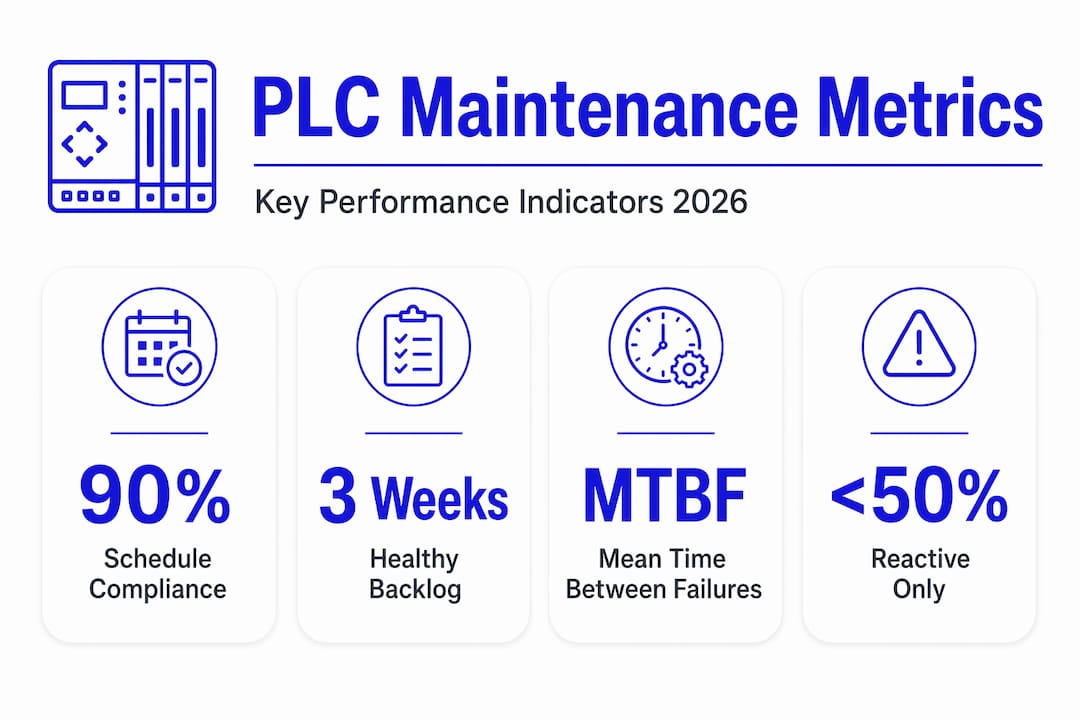
Schedule compliance measures the percentage of planned work orders completed in the scheduled week. Programs achieving above 90% compliance are considered high-performing. If you are consistently below 80%, the root cause is almost always incomplete work orders or scheduling inside unavailable production windows.
Backlog health tracks how many planned work orders are waiting for a confirmed slot. A healthy backlog is three to four weeks of PM work. A backlog growing beyond six weeks signals that scheduling is not keeping pace with planning output.
MTBF adjustment is where your CMMS earns its budget. Set initial PM intervals at 80 to 90% of MTBF calculated from failure history, then adjust after 12 to 18 months of collected maintenance data. A PLC module failing at month seven consistently should have its PM interval reduced to six months, not left at the original OEM-suggested 12.
| Scheduling approach | Schedule compliance | Typical MTBF impact |
|---|---|---|
| Reactive only | Below 50% | Shortened by 30 to 50% |
| Calendar-based PM, no data feedback | 60 to 75% | Baseline OEM estimate |
| Calendar PM plus PLC fault data triggers | 80 to 90% | 20 to 40% improvement |
| Full predictive integration with CMMS | Above 90% | Maximized for equipment class |
Trending cycle time deviations and rising fault frequencies in PLC data are early indicators that act like a low-oil warning light. Build a monthly review cycle where your planner pulls these trends and uses them to adjust the next quarter’s PM schedule.
Continuous improvement here is not theoretical. Plants that commit to quarterly schedule reviews and data-driven interval adjustments consistently outperform those running static annual checklists. The difference compounds over time in uptime, labor costs, and capital expenditure on replacements.
My take on the planning-scheduling divide
I have watched more PLC maintenance programs collapse from structural confusion than from any technical failure. In my experience, the moment a maintenance supervisor hands a technician a work order that was written the same morning it was assigned, the schedule has already failed. There was no time to stage parts, confirm the equipment window, or verify the procedure. The technician improvises, and improvisation in a PLC cabinet is where preventable failures happen.
What I have found actually works is treating planning as a dedicated weekly function, done days ahead of the schedule freeze. The planner reviews PLC fault logs, checks parts inventory, writes or updates work order procedures, and flags condition-based work that needs inserting. The scheduler then takes that prepared backlog and builds a weekly plan around confirmed production gaps. These are two different cognitive tasks. One is analytical and detail-oriented; the other is logistical and negotiation-based with operations.
The deeper insight is that PLC operational data turns this whole process from reactive to genuinely predictive. I have seen plants using production line automation data to identify failing modules weeks before any alarm fires. The fault register tells you a module is trending toward failure. The schedule gives you a slot to replace it before it decides the timing for you. That shift in who controls the timeline is what transforms a maintenance culture.
— Monica
Keep your PLCs running with the right parts on hand
When your maintenance schedule flags a module for replacement, the last thing you need is a six-week OEM lead time on a legacy component.

Industrialpartsusa specializes in exactly the parts that standard distributors cannot quickly source: GE Fanuc Series 90-30 and RX3i modules, Allen-Bradley legacy racks and I/O cards, Mitsubishi, Omron, and other hard-to-find components. Every part is tested, cleaned, and backed by a one-year warranty from Global Electrical and Industrial. If your maintenance schedule calls for a spare module and your current supplier says “eight weeks,” check Industrialpartsusa first. Same-day shipping on in-stock items means your planned replacement window stays on schedule. For legacy and obsolete PLC parts that keep your existing lines running, and for Allen-Bradley rack solutions that fit your current architecture, Industrialpartsusa is the resource your maintenance plan needs in its corner.
FAQ
What tasks belong on a PLC maintenance checklist?
A PLC maintenance checklist should cover hardware tasks (visual inspection, filter changes, terminal torque checks, thermal imaging) and software tasks (fault log review, program backup verification, diagnostic buffer clearing). Both categories need defined intervals tied to equipment criticality and operating environment.
How often should PLC cabinet filters be replaced?
Filters in PLC control cabinets should be replaced every 6 to 12 months under normal conditions. In dusty or high-heat environments, inspection monthly and replacement every two to three months is more realistic.
What is the difference between maintenance planning and scheduling?
Planning defines the work: procedures, parts, and safety documentation. Scheduling commits that prepared work to a specific technician within a confirmed equipment downtime window. Treating these as one role is a primary cause of schedule failure.
How can PLC data improve a preventive maintenance schedule?
Cycle counts, fault codes, and runtime hours from PLCs enable condition-based work order triggers without additional sensors. Trending rising fault frequency or deviating cycle times lets your planner insert a corrective work order before the failure occurs.
What schedule compliance rate indicates a healthy PLC maintenance program?
Programs consistently achieving above 90% schedule compliance are considered high-performing. Below 80% typically points to incomplete work orders or scheduling conflicts with production availability.