
The Role of HMI in Automation: What Engineers Need to Know
Most engineers who’ve spent time on a plant floor know that the role of HMI in automation goes far beyond a touchscreen with blinking status lights. Yet HMIs are routinely underestimated, treated as glorified control panels rather than the strategic interface layer they actually are. When your HMI is well designed and properly integrated, it becomes the single most powerful tool operators have for understanding, controlling, and improving a complex industrial process. When it isn’t, it’s a liability.
Table of Contents
- Key takeaways
- The role of HMI in automation systems
- From passive screens to strategic integration hubs
- HMI design standardization and best practices
- How HMIs improve operational efficiency and safety
- My take: HMI is not a screen, it’s a system
- Get the right HMI and automation parts faster
- FAQ
Key takeaways
| Point | Details |
|---|---|
| HMIs sit between humans and machines | They translate raw PLC data into visual dashboards, alarms, and controls operators can act on immediately. |
| Standardized design reduces errors | Consistent graphics, tagging conventions, and hierarchical navigation directly cut operator mistakes and fault response time. |
| Modern HMIs are integration hubs | Today’s HMI technology connects to MES, ERP, IIoT, and AI layers, not just PLCs and SCADA systems. |
| Design quality determines safety outcomes | Following ISA101.01 standards reduces alarm fatigue and cognitive overload in high-stakes environments. |
| Modernization requires a phased approach | Effective HMI upgrades start with a site audit and end with real-world field validation before full deployment. |
The role of HMI in automation systems
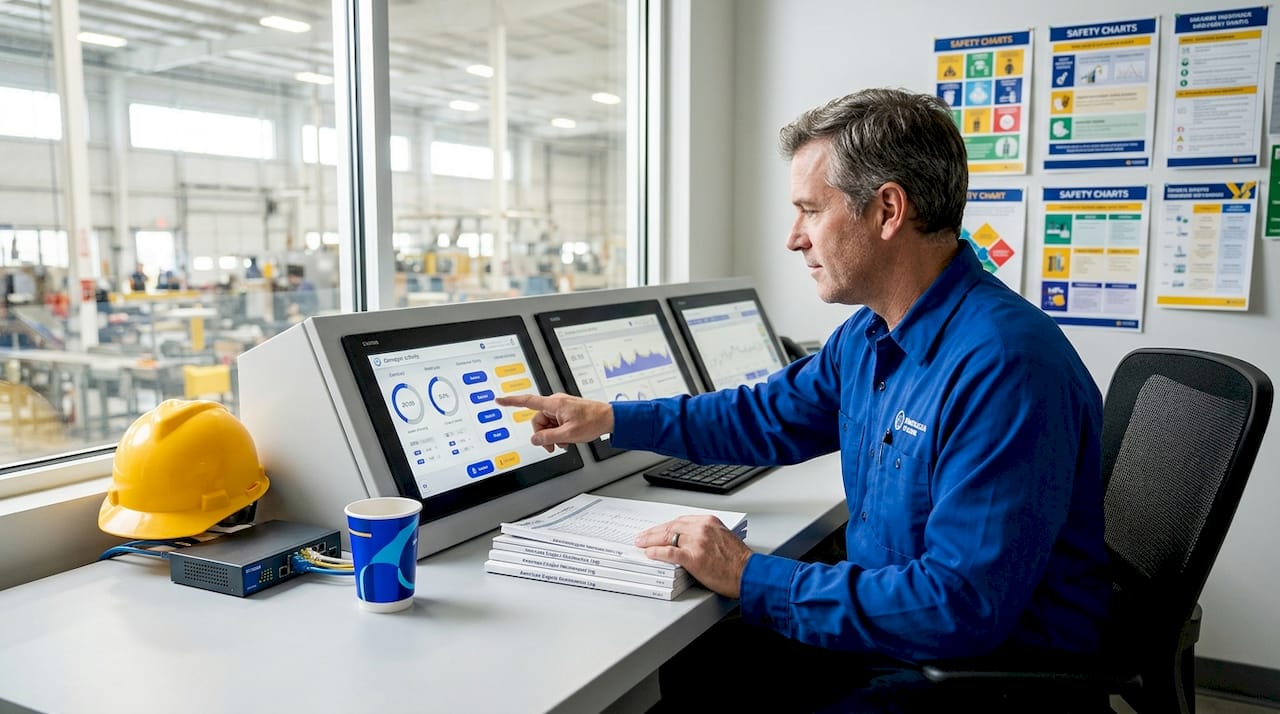
At its core, an HMI (Human Machine Interface) is the layer that sits between a human operator and an automated system. It translates the raw binary logic of a PLC into something a person can read, interpret, and act on in real time. Real-time data visualization, dashboards, alarm notifications, and interactive controls are all functions that define what an HMI does on the plant floor.
To be precise about the distinctions: a PLC executes logic and controls physical I/O. A SCADA system handles supervisory data collection across multiple sites or processes. The HMI is the visual interface layer, the screen and software through which operators interact with machines, monitor status, and issue commands. These three components work together, but they are not interchangeable, and confusing their roles leads to poor system architecture decisions.
What HMIs actually do on the plant floor
In practical terms, HMI applications in automation span a wide range of functions that go well beyond simple on/off commands. Here is what a properly deployed HMI handles:
- Process visualization: Live process graphics showing tank levels, conveyor speeds, valve positions, and temperature readings at a glance
- Alarm management: Prioritized alarm queues that alert operators to abnormal conditions before they escalate into shutdowns or safety events
- Control commands: Manual overrides, setpoint adjustments, and mode changes executed directly from the HMI screen
- Data logging: Trend charts and historical data capture that support root cause analysis and performance reporting
- System status: Equipment health indicators, PLC communication status, and I/O diagnostics visible without opening a cabinet
The HMI in industrial automation is not a passive display. It is a decision-support tool. An operator watching a continuous process across multiple units depends on that screen to prioritize where to look and what to do next. The quality of that interface directly affects how fast and how accurately they respond.
Pro Tip: When evaluating HMI software for a new project, ask vendors specifically how they handle alarm shelving, alarm prioritization, and operator acknowledgment logging. These features reveal whether the platform was built for real operational environments.
From passive screens to strategic integration hubs
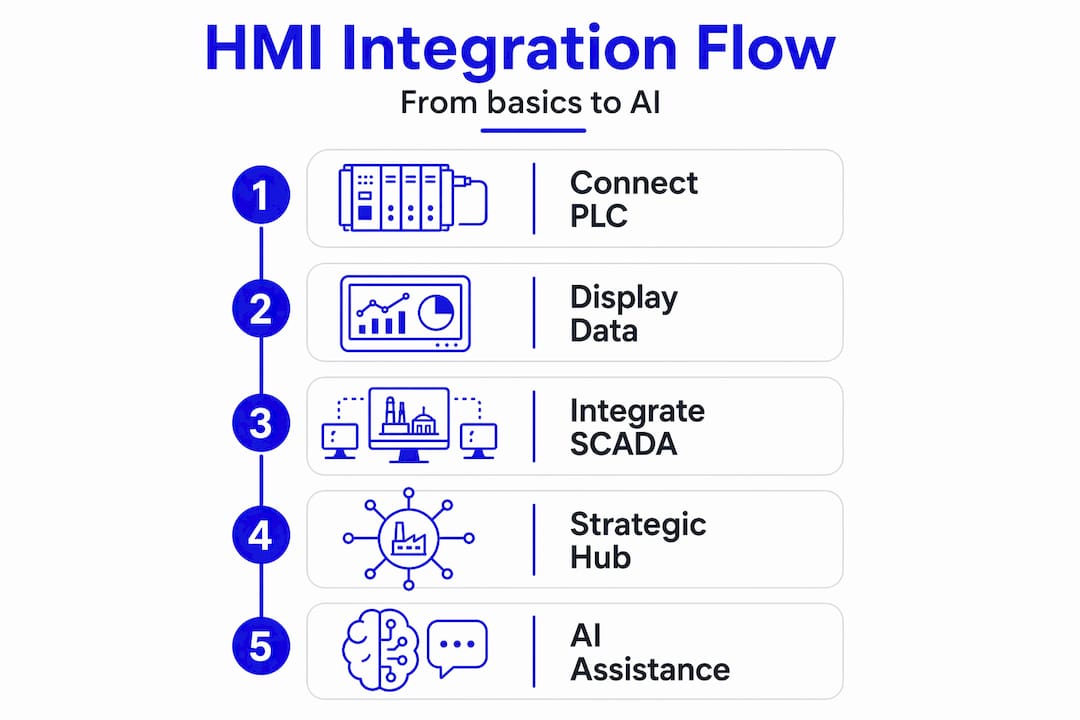
The traditional view of HMI technology in automation was straightforward: connect to a PLC, display some tags, build a few screens. That model is obsolete. Modern HMIs serve as strategic integration hubs that aggregate data from IIoT devices, cloud platforms, MES systems, and ERP layers simultaneously, using protocols like OPC UA to normalize data across disparate systems.
This shift changes what engineers should expect from an HMI platform. The software is no longer just a window into a single PLC. It is a data aggregation and routing layer that feeds information up the enterprise stack and pulls contextual data back down to the operator. A batch record from your ERP can appear alongside live reactor conditions on the same screen. A maintenance work order can be generated automatically when a vibration sensor exceeds its threshold.
AI-assisted operation is already here
Artificial intelligence integration in HMI software is no longer theoretical. AI assists operators today through scripting support, natural language query interfaces, debugging recommendations, and anomaly detection that flags deviations before the process moves out of spec. For newer operators especially, this changes the learning curve significantly.
Consider the practical benefits this delivers:
- Scripting and configuration help: AI embedded in HMI development environments can generate tag connections, screen layouts, and logic based on plain language prompts
- Anomaly detection: Pattern recognition algorithms monitor process data continuously and surface abnormal conditions that a human scanning multiple screens might miss
- Decision support: Context-aware guidance pushes recommended actions to operators based on historical outcomes for similar conditions
- Predictive maintenance triggers: HMI platforms connected to condition monitoring data can flag equipment for inspection before failure occurs
The role of HMIs shifting from passive screens to active intelligence nodes is one of the most significant changes in industrial automation right now. Engineers designing new systems or upgrading legacy ones should account for this trajectory when selecting platforms and architecture.
HMI design standardization and best practices
Here is an uncomfortable truth that experienced automation engineers already know: the visual quality of an HMI screen has almost nothing to do with how useful it is. Screens loaded with animated graphics, gradients, and color-coded equipment often perform worse than simple, gray-background displays built to ISA101.01 standards. The reason is cognitive load. Operators reading complex, visually busy screens in a high-stress moment process information more slowly and make more errors.
Standardized HMI design with consistent graphics, hierarchical navigation, and uniform faceplates reduces the time operators spend searching for information during critical conditions. That reduction directly affects safety outcomes and process uptime.
How to approach HMI standardization
Effective HMI modernization is a structured process, not a single-day task. Below is a practical phased approach that applies to both greenfield builds and legacy upgrades:
- Site audit and discovery: Document all existing screens, tag structures, alarm configurations, and operator workflows before touching anything
- Standards definition: Establish your graphic library, color conventions, faceplate templates, and navigation hierarchy based on ISA101.01 or your internal standard
- Tag structure review: Standardized naming and grouping at the PLC tag level is the actual bottleneck for HMI scalability. Fix chaotic tag naming before building new screens
- Screen development and review: Build screens against the defined standard, with review cycles that include operators, not just engineers
- Field validation: Test screens in actual operational conditions, not just in a development environment, before going live
The comparison below shows what separates an HMI that works from one that creates problems:
| Design element | Poor practice | Best practice |
|---|---|---|
| Color use | Red/green everywhere for status | Gray base with color reserved for abnormal states |
| Alarm priority | All alarms same appearance | Visual hierarchy: critical, high, medium, low |
| Navigation | Flat, no hierarchy | Levels 1 to 4 from overview to detail |
| Tag naming | Descriptive but inconsistent | Structured, predictable, instrument tag-based |
| Screen density | Maximum data per screen | Minimum data needed for decision-making |
Pro Tip: Following ISA101.01 standards is not about aesthetics. It is about reducing alarm fatigue and cognitive overload, which are direct contributors to operator error in complex industrial environments.
How HMIs improve operational efficiency and safety
The practical case for investing in HMI design for automation is straightforward. Modern HMI software delivers “at-a-glance” situational awareness that is critical for lean operator teams managing complex, multi-unit processes. When one operator is responsible for watching 40 process variables across three units, every second saved reading a screen is a second available for decision-making.
Here is where the benefits of HMI in automation show up most clearly in practice:
- Faster fault response: Operators using well-designed HMIs with prioritized alarms locate the source of a deviation faster than those working with cluttered, unstructured screens
- Reduced operator errors: Alarm management with prioritization and collaborative tools helps operators respond to the right event at the right time, reducing incorrect actions under pressure
- Remote monitoring capability: Web-based HMI software supports remote access and enterprise-wide visibility, allowing engineering and management teams to monitor processes without being physically present in the control room
- Predictive maintenance enablement: When HMIs aggregate condition monitoring data from sensors alongside process data, maintenance teams can act on trends rather than failures
The benefits of automated manufacturing compound significantly when HMI design keeps pace with automation complexity. A plant that automates physical processes but leaves the operator interface stuck in 1998 is leaving substantial efficiency gains on the table.
My take: HMI is not a screen, it’s a system
I’ve watched a lot of modernization projects go sideways, and the pattern is almost always the same. The engineering team spends months on PLC logic, network architecture, and field instrumentation. Then, in the final weeks before commissioning, someone says “we still need to build the HMI screens.” What follows is a rushed job with inconsistent graphics, no alarm strategy, and tag names that make sense only to the person who wrote them.
What I’ve learned from that cycle is that HMI design should start at the same time as PLC programming, not after it. The tag naming decisions you make in the PLC directly determine how maintainable and scalable your HMI will be years later. In my experience, fixing a chaotic tag structure in a production system is one of the most painful and expensive tasks in industrial automation.
I also think the industry underestimates how much a well-designed HMI affects operator retention. Experienced operators who can read a process at a glance carry enormous institutional knowledge. When you give them an interface that respects their workflow and reduces unnecessary cognitive load, they are more effective and more likely to stay. That matters on any plant floor, but especially in facilities running with leaner teams.
The future I see is one where HMI platforms function as the primary intelligence layer in the automation stack, not just a visualization tool. The systems that get there first will have a real operational advantage. It won’t happen by accident. It requires treating HMI design as a discipline, not an afterthought.
— Monica
Get the right HMI and automation parts faster
Whether you are upgrading an aging HMI platform, sourcing a replacement panel for a legacy system, or building out a new automation architecture, having the right parts available without a six-month OEM lead time changes everything.
Industrialpartsusa stocks new, surplus, and remanufactured automation components including HMIs, PLCs, I/O modules, and drives across GE Fanuc, Allen-Bradley, Mitsubishi, Omron, Beijer, and more. Every part is tested and backed by a one-year warranty. If you need GE Emerson I/O modules or a hard-to-find legacy component, Industrialpartsusa ships same day on in-stock items. Visit Industrialpartsusa to search inventory or reach the team directly for sourcing help.
FAQ
What is the primary role of HMI in automation?
An HMI (Human Machine Interface) is the interface layer that translates PLC data and process signals into visual dashboards, alarms, and controls that operators can monitor and act on in real time. It sits between the human operator and the automated system, making complex process data readable and actionable.
How does HMI interact with PLCs and SCADA systems?
A PLC executes control logic and manages field I/O. The HMI reads PLC tags and presents that data visually to the operator. SCADA handles supervisory data collection across broader systems. All three serve distinct roles, and a well-architected automation system uses each appropriately rather than substituting one for another.
Why does HMI design standardization matter for safety?
Inconsistent HMI design forces operators to search for information under pressure, which increases errors and slows response times. Following standards like ISA101.01 reduces alarm fatigue and cognitive overload, directly improving safety outcomes in complex industrial environments.
Can modern HMIs connect to cloud and enterprise systems?
Yes. Modern HMI technology supports integration with MES, ERP, and IIoT platforms using protocols like OPC UA. Web-based HMI software also enables remote monitoring and enterprise-wide process visibility without requiring physical presence in the control room.
How is AI changing the role of HMI in industrial automation?
AI embedded in HMI platforms now assists operators with scripting, anomaly detection, and decision support. These capabilities lower the barrier for newer operators while giving experienced ones faster access to pattern-based insights that support predictive maintenance and process optimization.
Recommended
- Global Electrical and Industrial – Your Partner in Automation
- GE Emerson Series 90-30 IC693APU305 I/O Link Module – Global Electrical and Industrial
- GE Emerson Genius I/O Industrial Automation Part IC660TBA101 – Global Electrical and Industrial
- GE Emerson Genius I/O IC660ELB906 Industrial Automation Module – Global Electrical and Industrial