
RX7i PLC Guide for Industrial Automation Pros
The RX7i is a Programmable Automation Controller built on a VME64 bus architecture, designed for large-scale, mission-critical industrial applications including petrochemical processing and power generation. Unlike standard PLCs, it supports hot-standby CPU redundancy and hot-swappable I/O modules, making it one of the most capable platforms in the GE PACSystems family. Engineers working with legacy Series 90-70 systems, managing complex distributed I/O networks, or planning a platform upgrade will find the RX7i control system worth understanding in depth.
What are the RX7i hardware specifications and architecture?
The RX7i uses a parallel processing VME64 backplane that separates I/O traffic from CPU processing. This design prevents a surge in I/O activity from slowing down scan time, which matters in high-speed process control. The result is deterministic, real-time performance even under heavy load.
The controller’s modular design lets you build from a small single-rack system up to a large distributed configuration with multiple remote I/O drops. Key hardware modules include:
- CPU modules: Intel embedded processors handle multi-tasking and real-time ladder, function block, and structured text execution simultaneously.
- Redundancy modules: Enable hot-standby CPU redundancy so a backup CPU takes control in milliseconds if the primary fails.
- Genius Bus Controller modules: Manage distributed Genius I/O networks across the plant floor.
- Communication modules: Support Ethernet, serial, and fieldbus protocols for integration with SCADA and HMI systems.
- I/O modules: Hot-swappable, meaning you can replace a failed module without shutting down the rack.
| Module type | Primary function |
|---|---|
| CPU (IC698CPE020/030) | Program execution and system management |
| Redundancy module | Synchronizes primary and backup CPU states |
| Genius Bus Controller | Manages remote Genius I/O network segments |
| Ethernet interface | SRTP and Modbus TCP communication |
| Power supply | Redundant 24V DC or 120/240V AC options |
The RX7i differs from the RX3i in a fundamental way. The RX3i uses PCI Express backplane and targets scalable machinery control. The RX7i uses VME64 and targets DCS-style applications at larger scale. They are not interchangeable platforms.
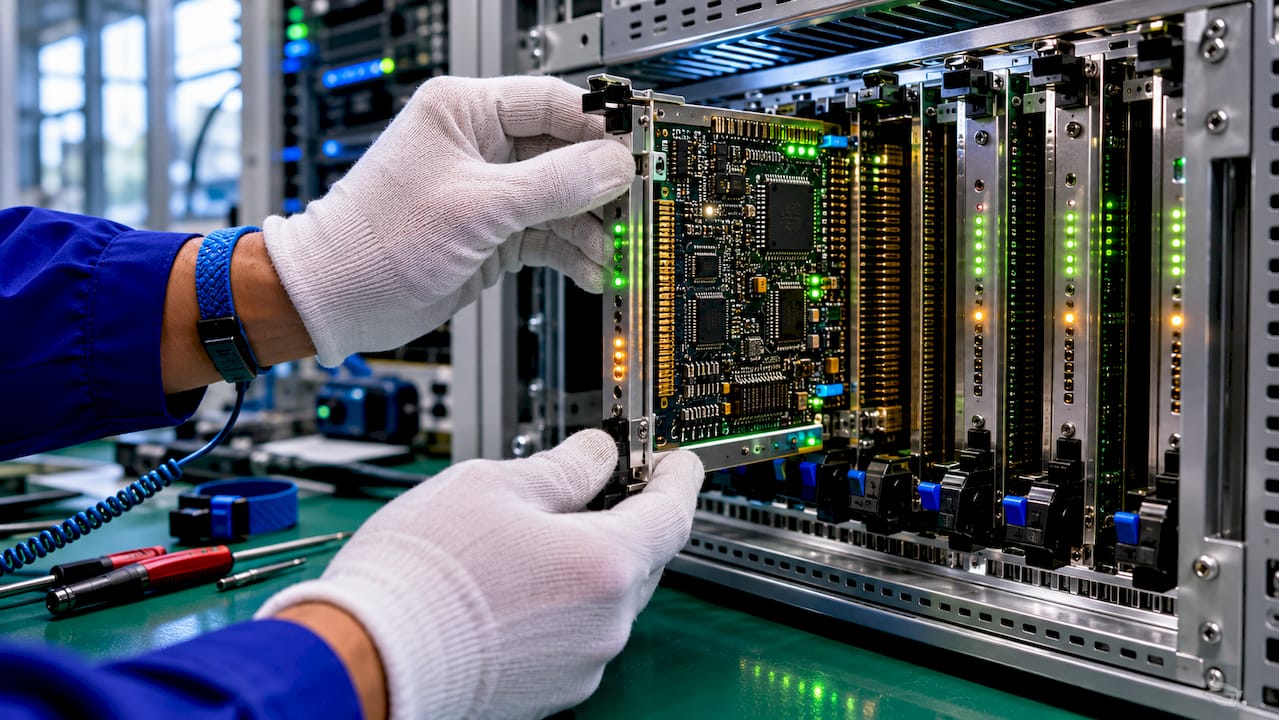
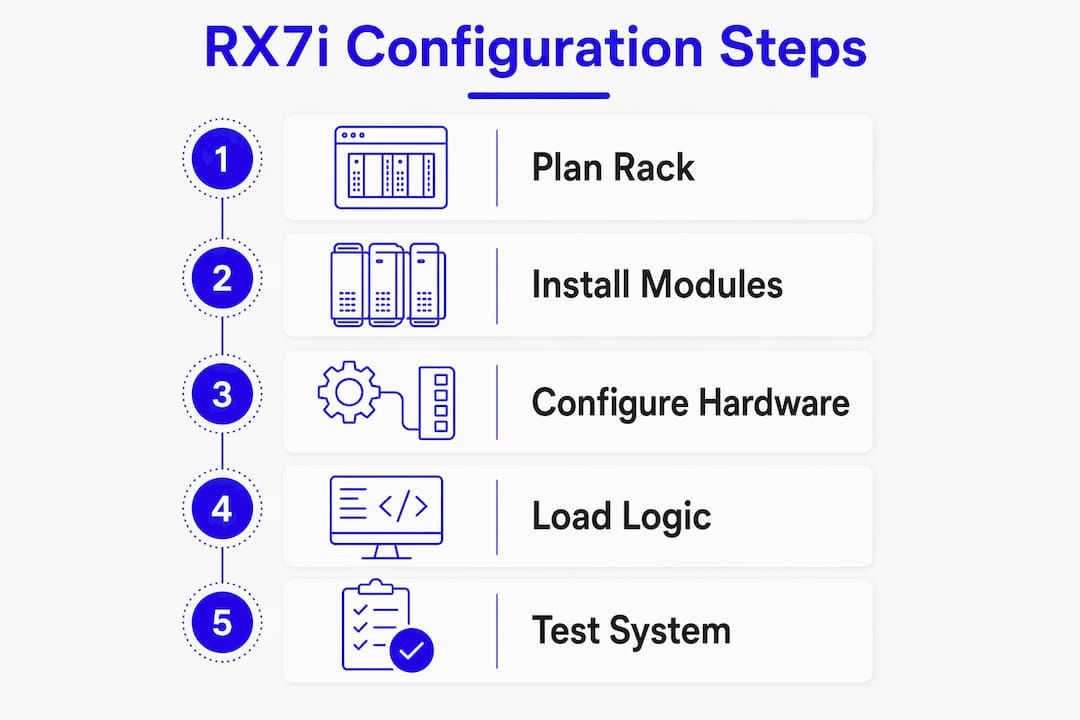
Pro Tip: When sizing a new RX7i system, plan your rack layout with redundancy modules and communication cards first. I/O modules fill remaining slots. Reversing that order forces costly rack redesigns later.
How to migrate legacy Series 90-70 projects to the RX7i platform
Migration from Series 90-70 to the RX7i is straightforward in concept but requires careful execution. The learning curve is minimal for engineers already familiar with the 90-70 environment because Proficy Machine Edition serves as the unified programming tool for both platforms.
Follow these steps for a clean migration:
- Back up the live 90-70 project. Export the full project from the existing programming software before touching anything. This is your recovery point.
- Open Proficy Machine Edition and use Project > Migrate. PME’s built-in migration function converts the 90-70 project structure to the RX7i format, retaining base register addressing.
- Review nickname conflicts manually. PME flags variable names that conflict with RX7i reserved words or tag-based memory conventions. Each conflict requires a manual decision. Do not auto-resolve all conflicts without reviewing them.
- Check for deprecated instructions. Some 90-70 function blocks do not exist in the PACSystems instruction set. PME marks these, but you must replace them with equivalent RX7i instructions before the project will compile.
- Update the hardware configuration. The 90-70 rack and module assignments do not transfer automatically. Rebuild the hardware config in PME to match your new RX7i physical rack layout.
- Simulate and test offline. Use PME’s software simulation to verify logic behavior before downloading to the live system.
- Download and verify online. After going live, monitor I/O status and fault tables for the first full production cycle.
Migration planning is smoother when you review deprecated instructions and memory addressing schemes before starting the conversion. Surprises discovered mid-migration cause the most downtime.
Pro Tip: Print the full nickname conflict report from PME before starting reconciliation. Work through it with the original programmer if possible. Context on why a variable was named a certain way prevents logic errors that testing alone may not catch.
What causes RX7i System Configuration Mismatch errors?
A System Configuration Mismatch error is one of the most common faults on the RX7i platform. It appears when the software configuration stored in the CPU does not match the physical hardware present on the Genius I/O network. The cause is almost never a software bug. It is almost always a physical or wiring issue.
The most frequent causes include:
- Module ID mismatches: A replacement I/O block has a different device number than the one configured in PME.
- I/O count discrepancies: The number of I/O points configured in software does not match what the Genius Bus Controller sees on the network.
- Missing or incorrect termination resistors: 150Ω resistors are required at both ends of every Genius bus segment. Missing resistors cause intermittent communication faults that show up as configuration mismatches rather than link errors. This is the most commonly overlooked cause.
- Incorrect cabling: Genius bus uses a specific shielded twisted-pair cable. Substituting standard Ethernet or control cable introduces signal reflections.
The diagnostic process follows a clear sequence. First, use a Genius Handheld Monitor to scan the network and confirm which devices are responding and at which addresses. Second, compare that scan result against the hardware configuration in PME. Third, check the fault tables in PME for slot-specific errors that point to the exact module causing the mismatch.
Checking physical 150Ω resistor placements should be among the first diagnostic steps, not the last. Engineers who skip this step spend hours chasing software settings when the answer is at the end of the cable.
Pro Tip: Label both termination resistor locations on your as-built drawings. When a technician replaces a Genius bus segment during a shutdown, missing termination is the single most common cause of a failed restart.
How does RX7i redundancy architecture improve system availability?
The RX7i achieves high availability through Hot Standby CPU redundancy combined with careful network design. Hardware redundancy alone is not enough. A complete redundancy design that includes network segmentation and dedicated physical media outperforms hardware-only approaches in real-world uptime.
Key elements of a well-designed redundant RX7i system include:
- Dual Genius Bus Controllers: Each redundant CPU rack carries its own Genius Bus Controller. Both controllers monitor the same I/O network, so the backup CPU has current I/O data at all times.
- Dedicated HMI network: HMI traffic belongs on a dedicated VLAN or fiber optic backbone, completely separate from the Genius I/O bus. Mixing HMI polling with I/O traffic saturates the bus and causes missed scans.
- Genius bus loading limits: In large Hot Standby configurations, limit each Genius Bus Controller to 30–40 I/O points. Exceeding this threshold degrades deterministic response times and can cause the backup CPU to lose synchronization with the primary.
- Redundant power supplies: Each CPU rack should have independent power feeds from separate breakers or UPS units.
- Fiber optic redundancy links: Use fiber for the CPU-to-CPU synchronization link in environments with high electrical noise, such as near large motor drives or welding equipment.
For automation redundancy best practices, the RX7i’s architecture gives you the building blocks. How you wire and configure those blocks determines whether you actually hit 99.9%+ availability in practice.
Pro Tip: Test your redundancy switchover under load during commissioning, not during a real fault. Trigger a manual CPU switchover while the process is running and verify that the backup takes control within the expected window. Document the switchover time for your maintenance records.
What practical tips improve RX7i configuration management?
Good configuration management prevents the majority of RX7i maintenance headaches. The most important tool in your workflow is Proficy Machine Edition build 5.9 or later. PME build 4699 and above supports separate upload and download of hardware configuration and logic. This means you can upload only the hardware config from a live CPU without overwriting the logic, or vice versa.
Practical configuration management habits worth building:
- Always verify your offline project matches the live CPU before making any changes. Use PME’s compare function to check for drift between what is in the CPU and what is in your project file.
- Upload hardware config separately before any logic change. This captures any field modifications made directly to the CPU that are not yet in your project file.
- Document Genius bus termination points on your wiring diagrams. Verify correct Genius bus termination and cabling standards after every maintenance window that involves bus work.
- Use I/O fault tables and module LEDs together. The fault table tells you which slot has a problem. The LED on the physical module tells you whether the issue is power, communication, or I/O field wiring.
- Never download a full project to a running system without confirming the hardware config section matches the physical rack. A mismatched hardware config download forces the CPU into stop mode.
Uploading hardware config separately from logic is critical for preserving live settings when modifying running systems. This single practice reduces the risk of unintended outages more than any other workflow change.
Key Takeaways
The RX7i delivers mission-critical performance through VME64 architecture, Hot Standby redundancy, and Proficy Machine Edition, but only when physical network standards and configuration management practices are followed correctly.
| Point | Details |
|---|---|
| VME64 architecture | The RX7i uses VME64 bus, not PCI Express, making it suited for large DCS-style applications. |
| Migration with PME | Use Proficy Machine Edition’s Project > Migrate function and manually resolve all nickname conflicts before compiling. |
| Termination resistors | Install 150Ω resistors at both ends of every Genius bus segment to prevent configuration mismatch faults. |
| Genius bus loading | Limit each Genius Bus Controller to 30–40 I/O points in Hot Standby systems to maintain deterministic scan times. |
| Separate config uploads | Use PME build 5.9+ to upload hardware config and logic independently, protecting live settings during maintenance. |
What I’ve learned from years of working with RX7i systems
The RX7i gets a reputation for being complex, but most of the complexity is in the physical layer, not the software. Every difficult troubleshooting call I have seen on this platform traced back to something physical: a missing termination resistor, a wrong cable type on the Genius bus, or a redundancy link running over copper in a high-noise environment. The software was fine. The wiring was not.
Migration from Series 90-70 is genuinely easier than most engineers expect, especially if they have used Proficy Machine Edition before. The nickname reconciliation step is where projects stall. Teams underestimate how many variable names in a 15-year-old 90-70 project conflict with RX7i reserved words. Budget real time for that review. It is not a 30-minute task on a large project.
The redundancy architecture is where the RX7i earns its place in petrochemical and power generation facilities. But I have seen plants invest in full Hot Standby hardware and then run HMI polling traffic over the same Genius bus as I/O. That single mistake eliminates most of the availability benefit. Network segmentation is not optional in a serious redundant deployment. It is the difference between a system that switches over cleanly and one that trips both CPUs simultaneously.
My advice for anyone managing an RX7i control system long-term: treat the Genius bus like a critical instrument loop, not a convenience network. Protect it, document it, and test your redundancy switchover at least once a year under load.
— Monica
RX7i parts and support from Industrialpartsusa
Finding RX7i hardware through standard OEM channels means long lead times and high prices for a mature platform. Industrialpartsusa stocks new, surplus, and remanufactured RX7i controllers, Genius Bus Controllers, and compatible Genius I/O modules for immediate shipment worldwide.

Every part ships with a one-year warranty backed by in-house testing and repair. Same-day shipping is available on in-stock items, which matters when a failed module is holding up production. Industrialpartsusa also carries the full range of GE legacy automation parts including Series 90-70 and RX3i components, making it a single source for mixed-generation plant environments. Visit Industrialpartsusa to check current stock and get a quote.
FAQ
What is the RX7i used for in industrial automation?
The RX7i is a Programmable Automation Controller designed for large-scale, mission-critical applications such as petrochemical processing, power generation, and heavy manufacturing. It supports hot-standby CPU redundancy and hot-swappable I/O on a VME64 backplane.
How does the RX7i differ from the RX3i?
The RX7i uses a VME64 bus architecture optimized for large DCS-style systems, while the RX3i uses a PCI Express backplane suited for scalable machinery control. They are not direct replacements for each other.
What causes System Configuration Mismatch errors on the RX7i?
The most common causes are module ID mismatches, I/O count discrepancies, and missing 150Ω termination resistors on the Genius bus. Use a Genius Handheld Monitor to scan the network and compare results against the PME hardware configuration.
How do I migrate a Series 90-70 project to the RX7i?
Use Proficy Machine Edition’s Project > Migrate function to convert the project, then manually reconcile nickname conflicts and replace any deprecated instructions before rebuilding the hardware configuration for the new rack layout.
What Genius bus loading limit applies to Hot Standby RX7i systems?
Limit each Genius Bus Controller to 30–40 I/O points in large Hot Standby configurations to maintain deterministic response times and keep the backup CPU synchronized with the primary.
Recommended
- RX3i PLC Guide for Plant Engineers: 2026 Edition – Global Electrical and Industrial
- How Robots Integrate with PLCs: Engineer’s 2026 Guide – Global Electrical and Industrial
- Global Electrical and Industrial – Your Partner in Automation
- GE Fanuc IC693CPU370 Industrial Automation CPU Module – Global Electrical and Industrial